Contact Us

    If you still have questions or prefer to get help directly from an agent, please submit a request.
    We’ll get back to you as soon as possible.

    Please fill out the contact form below and we will reply as soon as possible.

    • Digital Matter Site
    • Contact Us

    Introducing the Yabby3-4G

    Discover the features and benefits of the Yabby3-4G, a powerful device designed for seamless connectivity and enhanced performance.

    Written by Matthew Clark-Massera

    Updated at September 9th, 2026

      Contact Us

      If you still have questions or prefer to get help directly from an agent, please submit a request.
      We’ll get back to you as soon as possible.

      Contact Support
      • Home
      • Devices
      • Yabby3
      • Getting Started

      Table of Contents

      The Yabby3-4G Provisioning your Yabby3 Features Additional resources

      The Yabby3-4G


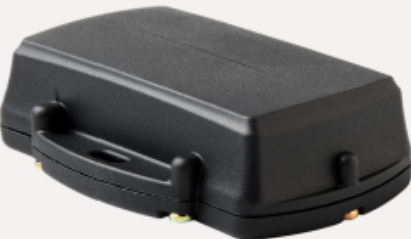
      The Yabby3-4G is the next-generation of our Yabby series. It is an ultra-rugged GPS asset tracking device featuring 10+ years battery.

      Click here to see detailed specifications. 


      Provisioning your Yabby3

      1. Initial Provisioning - Yabby3 
      2. Choose a SIM Card Provider
      3. Install a Micro (3FF) SIM Card
      4. Review Admin Parameters
      5. Insert Batteries 
      6. Seal the Housing
      7. Integration (Product Code: 97.1)
         
      8.  

        Features

          Tracking Features    

      Feature Description
      Scheduled Uploads Configure specific times for a device to upload its data.

      Inactivity Timer

      Receive an alert when your assets are being underutilized.

      Basic Tracking

      These parameters determine the tracking mode and tracking intervals. 

      Tracking Mode Wake Filter 

      Filters out the small movements noticed by the accelerometer

      Upload timeout


      Select a registration strategy and specify the duration the device will attempt to upload data before timing out.
      GPS Settings Set the minimum accuracy requirements for a fix to be considered 'valid'.

      Accelerometer

      Adjust the accelerometer thresholds required to wake the device or begin a trip.

      Battery Voltage

      Set the battery low threshold.


            Enabling Features

      Time Zone and Daylight Savings


      Configure specific datetime settings to assist with scheduled uploads.

      After Hours

      Assign working times by days of the week and activate auto-recovery mode. 

      SMS

      Prevent the device from responding to unwanted SMS commands.

      High-G Detection

      When enabled, the device accelerometer will detect High-G events exceeding the specified force and duration.

      Tip Detection 

      Tip Detection feature allows you to define a range of angles that constitute a 'tipped' state.

      Recovery Mode 

      Easily switch from infrequent tracking to ‘live tracking’ to recover an asset.


          Critical parameters 

      • The Oyster3 has different configurable tracking modes to best fit a variety of applications Changing the Update Rate - Yabby3 


          Additional resources

      • Yabby Technical Drawing 
      • Battery Life Estimates -Yabby3 


      introducing yabby3 asset tracker gps asset tracker

      Was this article helpful?

      Yes
      No
      Give feedback about this article

      Related Articles

      • Yabby 3 LoRaWAN® Integration
      • Battery Life Estimates - Yabby3
      • Introducing the Yabby Edge LoRaWAN®

      Subscribe to Partner News

      Subscribe to our mailing list to receive Digital Matter news, product and tehnical updates, and more.

      Subscribe

      Copyright © Digital Matter . All Rights Reserved.

      Privacy Contact Support

      Knowledge Base Software powered by Helpjuice

      DM Logo
      Expand