Contact Us

    If you still have questions or prefer to get help directly from an agent, please submit a request.
    We’ll get back to you as soon as possible.

    Please fill out the contact form below and we will reply as soon as possible.

    • Digital Matter Site
    • Contact Us

    Introducing the Yabby Edge LoRaWAN®

    Written by Matthew Clark-Massera

    Updated at September 14th, 2023

      Contact Us

      If you still have questions or prefer to get help directly from an agent, please submit a request.
      We’ll get back to you as soon as possible.

      Contact Support
      • Home
      • Devices
      • Yabby Edge LoRaWAN®
      • Getting Started

      Table of Contents

      Yabby Edge for LoRaWAN® Key Info and Resources Key Technical Specifications DMLink Provisioning Cable + App DM Link Cable App Download Full Technical Specifications: High Resolution Images Technical Support and Advice Device Warranty

      The Yabby Edge for LoRaWAN® is our ultra-rugged and compact Indoor/Outdoor battery-powered asset tracker. It features cloud-based location solving for over 10+ years of battery life. 

      Key Features

      • GNSS, Wi-Fi AP MAC Address Scanning, and LoRaWAN® geolocation for indoor/outdoor asset management
      • Deploy-once battery life with up to 10+ years on only 2 x AAA user-replaceable batteries
      • Cloud-based location solving (versus on-device) for substantial power savings
      • Tracks assets when they’re on the move and enters sleep mode when stationary to save power
      • Weatherproof and ultra-rugged IP68 and IK06 rated housing
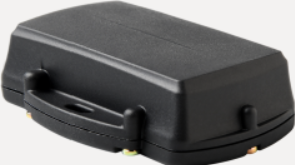
      Yabby Edge for LoRaWAN® Key Info and Resources

      Key Technical Specifications

      • 2-3.6V input voltage range
        • 2 x AAA batteries required - LiFeS2
      • LoRaWAN Regions
        • AU915
        • AS923-1
        • AS923-2
        • AS923-4
        • EU868
        • IN865
        • KR920
        • RU864
        • US915

      DMLink Provisioning Cable + App

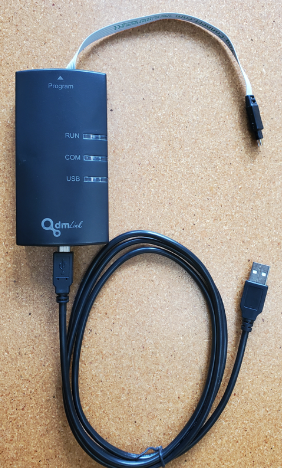
      To set the LoRaWAN region and other device parameters, a DMLink Cable and app are used. Contact your distributor to purchase a DMLink cable if you do not already have one. 

      DM Link Cable
      App Download

      https://www.oemserver.com/tools/LoRaWANProvisioningTool/setup.exe

      Full Technical Specifications:

      Find full technical specs on the product page on our website - https://www.digitalmatter.com/devices/yabby-edge-lorawan

      High Resolution Images

      Download high resolution images here: High Res Images

      Technical Support and Advice

      Digital Matter partners should Contact Support for any product issues or enquiries.

      Device Warranty

      See Digital Matter Warranty Returns Policy

      lorawan yabby

      Was this article helpful?

      Yes
      No
      Give feedback about this article

      Related Articles

      • Initial Provisioning - Yabby Edge LoRaWAN®
      • Yabby Edge LoRaWAN® - Configuration and Usage Guide
      • Yabby Edge LoRaWAN® Release Notes
      • Yabby Edge LoRaWAN - Improved GNSS Performance

      Subscribe to Partner News

      Subscribe to our mailing list to receive Digital Matter news, product and tehnical updates, and more.

      Subscribe

      Copyright © Digital Matter . All Rights Reserved.

      Privacy Contact Support

      Knowledge Base Software powered by Helpjuice

      DM Logo
      Expand