You are viewing an Archived item in your Knowledge Base, it is not publicly accessible.

    Contact Us

    If you still have questions or prefer to get help directly from an agent, please submit a request.
    We’ll get back to you as soon as possible.

    Please fill out the contact form below and we will reply as soon as possible.

    • Digital Matter Site
    • Contact Us

    Third Party Device Support in Telematics Guru

    Written by Matthew Clark-Massera

    Updated at January 8th, 2025

      Contact Us

      If you still have questions or prefer to get help directly from an agent, please submit a request.
      We’ll get back to you as soon as possible.

      Contact Support
      • Home
      • Telematics Guru
      • Third Party Devices

      Table of Contents

      Supported Device List Supported BLE Tags Third Party Device API

      Telematics Guru supports a number of 3rd party (non-DM) device types and BLE tags. While our range is extensive, there may be specific niche devices best served by a 3rd party device - or in some cases a user may wish to use an existing fleet of devices on TG.

      Supported Device List

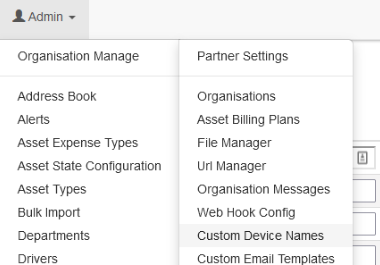
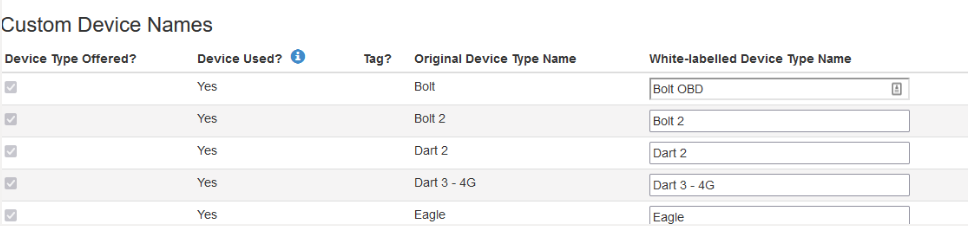
      The current list of integrated devices in TG can be viewed by heading to the "Custom Device Names" page from within a partner home organization.
      Device Type Notes
      Calamp
      • See CalAmp Support (BETA)
      • Basic implementation of Calamp's LM Direct protocol
      • Certain message types and records can be interpreted by TG
      DCT/Pegasus Device  
      eSky  

      Globalstar Devices:

      • SmartOne
      • SmartOne C
      • SmartOne Solar
      • Battery powered tracker using GlobalStar's satellite network
      • See Coverage Map
      • See Setup For Pivotel Smartone devices
      • The integration is for data sent via Pivotel Gateway
         
      SPOT
      Gen3 & Gen4
      • Battery powered, handheld personal satellite tracker. Typically used by hikers etc to allow for tracking and SOS alerts.
      • SPOT Devices (beta)
      • Data from Pivotel Gateway accepted
         
      Teltonika Devices
      • Teltonika FM11XX
      • Codes 8, 8E and 16 are supported, check with Teltonika which code your specific device uses
      • Not all device types are tested. The FM1120, FMC130 and FMC125 DM have seen working - but test before committing to a large deployment
      JDLink (John Deere)
      • JDLink - Telematics Guru
      • Allows John Deere Machine data to be sent to TG
      Garmin Inreach SE+
      • https://www.garmin.com/en-AU/p/561286
      • Battery powered, handheld Iridium satellite communicator
      • Telematics Guru is able to display the position of the unit on the live view.
      • Integration in Progress

      Supported BLE Tags

      See Tags in Telematics Guru

      Third Party Device API

      TG has a 3rd Party Device API. If data is sent via HTTP POST, in the correct format, it will be accepted and processed by TG. This means partners can integrate essentially any device, by writing a service to reformat any received data into the 3rd Party API format.

      Contact DM Support for Documentation.

      telematics device support

      Was this article helpful?

      Yes
      No
      Give feedback about this article

      Related Articles

      • CalAmp Support
      • JDLink - Telematics Guru
      • Telematics Guru Third Party Device API
      • Setup For Pivotel Smartone devices

      Subscribe to Partner News

      Subscribe to our mailing list to receive Digital Matter news, product and tehnical updates, and more.

      Subscribe

      Copyright © Digital Matter . All Rights Reserved.

      Privacy Contact Support

      Knowledge Base Software powered by Helpjuice

      DM Logo
      Expand