Hawk - Configure WNK8010TT Pressure Sensor

Written by Matthew Clark-Massera
Updated at October 6th, 2023
Table of Contents
Related Articles
Please ensure to also read the below for full details on configuring Tasks and I²C Sensors for the Hawk
The WNK8010-TT sensor is a pressure sensor commonly used for tank level measurements.
The WNK8010-TT has been integrated and tested specifcially - but other sensors of this family should also work.
3rd Party Sensor
As this is a 3rd Party sensor - the advice given below is general. Always check the product datasheet direct from the manufacturer. Specific guidance on installation and usage should be obtained directly from the manufacturer. The instructions below are based on a sensor tested at the time of article writing - things may change.
IO Card
Ensure a plug-in IO card with an I²C interface is fitted to the Hawk. Currently the only card with this interface is the AgTech1 card.
Wiring
NB - confusingly, this sensor uses blue for Ground and not black.
| WNK8010TT | Agtech1 | Bluetooth+ |
| VCC (Red) | Hawk IO 5 | Hawk IO 7 |
| SCL (Yellow) |
Hawk IO 6 | Hawk IO 5 |
| SDA (Black) | Hawk IO 4 | Hawk IO 6 |
| GND (Blue) | Hawk GND | Hawk GND |
Firmware
The AgTech1 card firmware should be set to 1.5.
IO card firmware can be set from the Device Details page of the Hawk which the card is plugged into.
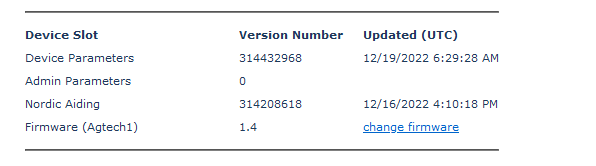
Parameters
I²C Action Parameters
- Select WNK Pressure Sensor as the Sensor Type
- Choose an Analogue to write the values to. 2 Values are returned, Pressure and Temperature.
- Sensor Parameter 1 is the pressure range minimum (in cm)
- Sensor Parameter 2 is the pressure range maximum (in cm)
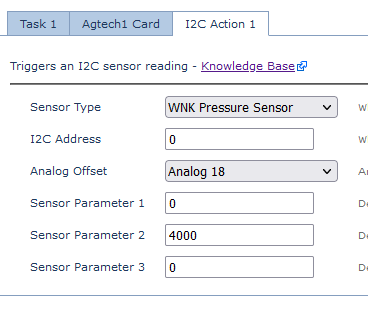
The I²C address can be left blank. It is fixed at 0x6D
Min/Max Range
The sensors come in various sizes and ranges - i.e 0-2000 or 0-4000. This is what the min/max values are used for.
I.e if you are using the 0-4000 version, enter 0 for the min and 4000 for the max.
The units of the sensor can be found on the sensor datasheet - mmH2O.
Task Parameters
Ensure the I²C action you have configured above (Action 1 or 2) is set as an action of the task.
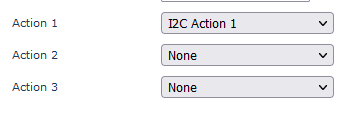
Output/Conversion
With the above parameters, the output would be:
| Value | Analogue | Units | Conversion Example |
| Pressure | Analogue Offset Value | mmH2O | 10 = 10mmH20 |
| Temperature | Analogue Offset Value + 1 | °C * 100 | 1500 = 15.0°C |
