Contact Us

    If you still have questions or prefer to get help directly from an agent, please submit a request.
    We’ll get back to you as soon as possible.

    Please fill out the contact form below and we will reply as soon as possible.

    • Digital Matter Site
    • Contact Us

    Hawk - Configure DM Ambient (Temp+Hum Sensor)

    Written by Matthew Clark-Massera

    Updated at October 6th, 2023

      Contact Us

      If you still have questions or prefer to get help directly from an agent, please submit a request.
      We’ll get back to you as soon as possible.

      Contact Support
      • Home
      • Devices
      • Hawk IoT Datalogger
      • I²C

      Table of Contents

      Related Articles Wiring Parameters I²C Action Parameters Task Parameters Output/Conversion

      Related Articles

      Please ensure to also read the below for full details on configuring Tasks and I²C Sensors for the Hawk

      • Hawk Operation - Task Schedules
      • Configure I²C Sensor Readings
       

      DM have limited remaining stock of our Ambient (Temp + Humidity) Sensor. It can be connected to the Hawk

      Wiring

      Ambient Sensor Wire Agtech1 Bluetooth+
      Red (3V3) Hawk IO 5 Hawk IO 7
      Brown (SCL) Hawk IO 6 Hawk IO 5
      Green (SDA) Hawk IO 4 Hawk IO 6
      Black (GND) Hawk GND Hawk GND
      Purple/Orange Not used, leave disconnected Not used, leave disconnected

      Parameters

      I²C Action Parameters

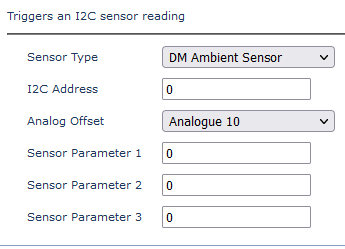
      1. Configure the I²C action parameters to select DM Ambient Sensor and an analogue offset. Leave other values blank
      Task Parameters

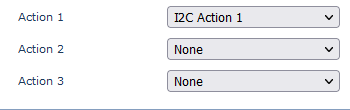
      We need to set I²C Action 1 or 2 as an action for a Task.
      Output/Conversion

      The specific analogues the readings will appear in is determined by the Analogue Offset selected.
      With the above parameters, the output would be:

      Value Analogue Units Conversion Example
      Temperature Analogue Offset Value (10) °C * 100 800 = 8°C
      Relative Humidity Analogue Offset Value + 1 (11) % * 100 5000 = 50%
      temp humidity dm ambient

      Was this article helpful?

      Yes
      No
      Give feedback about this article

      Related Articles

      • Configure I²C Sensor Readings
      • Hawk - Configure T9602 Temperature Probe
      • Hawk - Configure DM Temp Probe (Deprecated)
      • Hawk - Configure MaxBotix MB7040 I²C Ultrasonic Range Sensor

      Subscribe to Partner News

      Subscribe to our mailing list to receive Digital Matter news, product and tehnical updates, and more.

      Subscribe

      Copyright © Digital Matter . All Rights Reserved.

      Privacy Contact Support

      Knowledge Base Software powered by Helpjuice

      DM Logo
      Expand