Improved GNSS Performance on Edge Devices

Written by Matthew Clark-Massera
Updated at July 30th, 2025
Table of Contents
In case you missed it
On top of the below improvements, the Location Engine (server side) also makes use of 'Combo-Scan' functionality to improve location accuracy. See Edge Device GNSS 'Combo Scan'
Overview
Edge devices make use of the Semtech LR1110 Integrated Circuit to scan for GNSS satellites and Wi-Fi access points. Digital Matter and Semtech have worked together to now release a new version of firmware that improves the GNSS performance and is updatable over the air as a 240kB download on the Oyster Edge Cellular.
Performance Improvement
Edge devices feature low power GNSS scanning, where the device takes a brief snapshot of the current satellites in view and sends that information to the server, for the server to then calculate the position.
This greatly reduces the power consumption in comparison to a traditional GNSS device that leaves the receiver on while it calculates the position on the module itself. However, this comes at the cost of performance since traditional devices can continue calculating a position until they deem the uncertainty as acceptable.
The new firmware narrows this performance gap by doing an additional burst of five quick, targeted scans if it found satellites in its initial scan. This only marginally increases the power usage of a GNSS scan, while increasing the reliability and accuracy of the server-side position calculation.
Real World Results
Figure 1 is an overlay of 300 scans performed by two Oyster Edges, one with the old firmware (blue), and one with the new firmware (orange). It is visually evident that the new firmware increases the accuracy and reduces the likelihood of outliers.
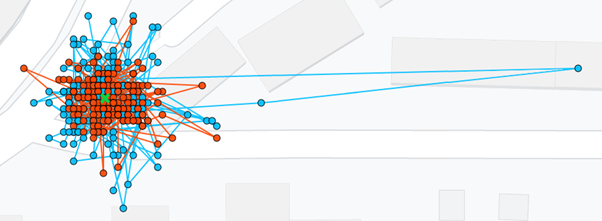
Figure 1: Outdoors comparison of old (blue) and new (orange) firmware in an urban area
An analysis of the data shows that the old firmware had an average accuracy of 9m, and a standard deviation of 9m, while the new firmware had an average accuracy of 6m and a standard deviation of 4m. Figure 2 is a CDF graph of the 300 outdoor positions further showcasing the improved accuracy of the new firmware. The graph shows that 95% of the positions were within 23m of the actual position for the old firmware, and within just 11m for the new firmware.
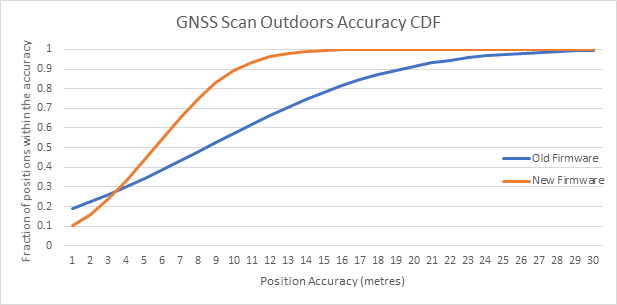
Figure 2: CDF of position accuracies outdoors
Figure 3 is a comparison of the firmware versions in one of the most difficult environments for GNSS – a narrow window in an urban area. The results have been filtered to only accept positions with uncertainties reported by the server of 80 metres or less, and approximately 20% of all lookups did not meet this threshold for both firmware versions.
It is visually evident that both sets of results have been skewed by the narrow sky view, with the newer firmware having fewer outliers.

Figure 3: Comparison of old (blue) and new (orange) firmware in a narrow window
An analysis of the data shows that the old firmware had an average accuracy of 49m, and a standard deviation of 43m, while the new firmware had an average accuracy of 39m and a standard deviation of 27m. Figure 4 is a CDF graph of the 300 indoor positions further showcasing the improved accuracy of the new firmware. The graph shows that 95% of the positions were within 120m of the actual position for the old firmware, and within just 80m for the new firmware.

Figure 4: CDF of position accuracies in a narrow window
Update Procedure
Edge devices can update the LR1110 firmware
The update procedure has 2 parts, both easily applied OTA via the Device Manager interface.
- Under the Device Admin Parameters, Enable the Update, and select the required version

- Apply firmware version 1.4 or above
Once the above steps are completed, the device will download and apply the firmware version on its next connection attempt.
If the device is already running the requested firmware version, it will not attempt to download it again. Failed download attempts due to poor coverage trigger an exponential backoff starting at 3 hours and maxing out at 2 days.
