Contact Us

    If you still have questions or prefer to get help directly from an agent, please submit a request.
    We’ll get back to you as soon as possible.

    Please fill out the contact form below and we will reply as soon as possible.

    • Digital Matter Site
    • Contact Us

    Telematics Guru Telemetry - Getting Started

    Written by Matthew Clark-Massera

    Updated at January 26th, 2023

      Contact Us

      If you still have questions or prefer to get help directly from an agent, please submit a request.
      We’ll get back to you as soon as possible.

      Contact Support
      • Home
      • Telematics Guru
      • TG Troubleshooting

      Table of Contents

      Telemetry I/O Mappings Example Telemetry

      Telemetry

      Status Flags are represented in the left most 8 bits

      31 30 29 28 27 26 25 24
      Recovery Mode Active
      Tamper Alert
      (Remoras)
      External Power Enabled
      Shunting power from battery
      Connected to GSM
      External Power Good
      Internal Battery good
      Trip Status

      Digital Inputs of the device are represented in the remaining 24 bits, Bits 0, 6 and 6 are commonly set across all devices.

      I/O Mappings

      The Input/output mappings are set for the individual Assets in Edit Asset, inside the Manage Asset menu. If you compare these value to the grid above, you'll see they all line up.
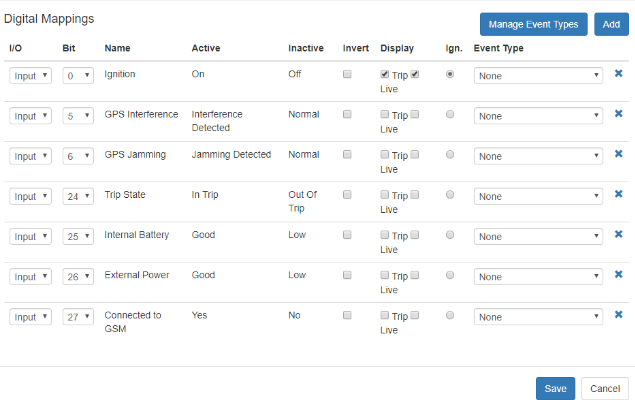
      Example Telemetry

      If we take a snapshot of a log's telemetry we can decode the state of the Asset. Note: remember that the bit number reads from right to left, starting at 0.

      Here we have a 1 or 'ON' status flag for bits '0', '5' and status flags '1', '2', '3', '4'.

      0000 1111 0000 0000 0000 0000 0010 0001
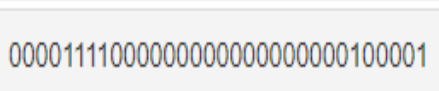
      Bit 0: Ignition = active
      Bit 5: GPS Interference detected
      Status Flag 0: Device is 'In Trip'
      Status Flag 1: Internal battery is 'Good'
      Status Flag 2: External power is 'Good'
      Status Flag 3: Connected to GSM network: 'YES'
      telemetry telematics

      Was this article helpful?

      Yes
      No
      Give feedback about this article

      Related Articles

      • Telematics Guru - Asset Addresses
      • GPS Age and Invalid Fixes
      • Can't Login to the Telematics Guru App?
      • Why Aren't I Receiving my Email/SMS Alerts or Reports?

      Subscribe to Partner News

      Subscribe to our mailing list to receive Digital Matter news, product and tehnical updates, and more.

      Subscribe

      Copyright © Digital Matter . All Rights Reserved.

      Privacy Contact Support

      Knowledge Base Software powered by Helpjuice

      DM Logo
      Expand