Contact Us

    If you still have questions or prefer to get help directly from an agent, please submit a request.
    We’ll get back to you as soon as possible.

    Please fill out the contact form below and we will reply as soon as possible.

    • Digital Matter Site
    • Contact Us

    View Device Logs

    Written by Matthew Clark-Massera

    Updated at February 10th, 2025

      Contact Us

      If you still have questions or prefer to get help directly from an agent, please submit a request.
      We’ll get back to you as soon as possible.

      Contact Support
      • Home
      • Device Manager
      • Troubleshooting

      Table of Contents

      Viewing Logs What do all the logs mean?
      This allows you to inspect data logged by the device. Please note:
      • Debug records are always captured and shown. The debug log level controls how many debug logs are recorded. Please see the article here for more details.
      • Device data logs are normally forwarded and not recorded. To see the process to enable the capture of the records, please see the article here
      • All logs for a device are deleted after 2 weeks, unless their data capturing is still active.

      Viewing Logs

      Click on details (1) for the device you are interested in:


      Go to the Logs tab (1)

      To narrow down the records show, specify the Start Date (1) and End Date (2). 
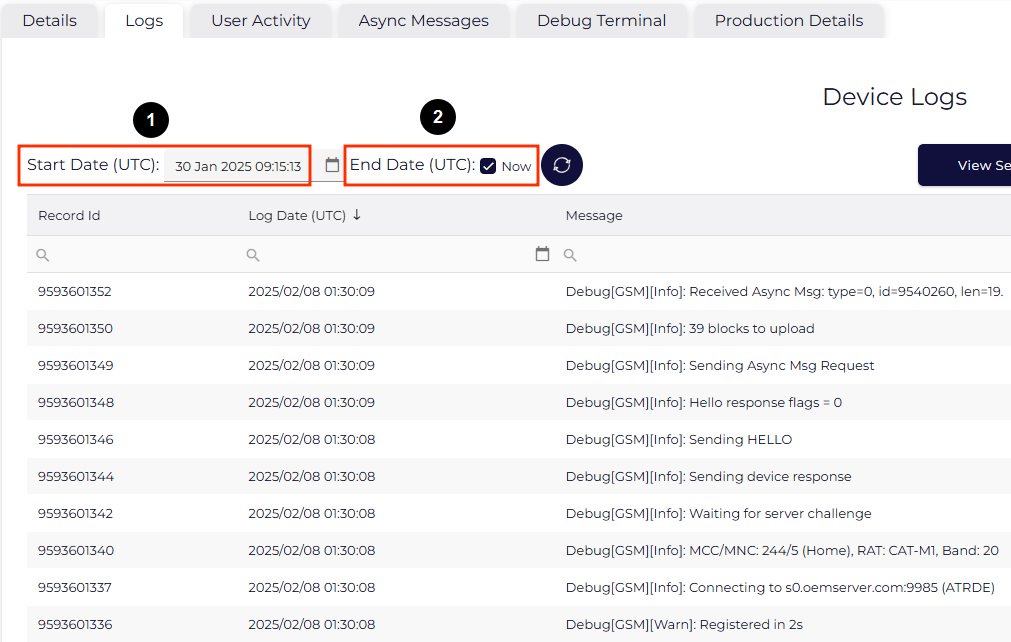
      If the Now (1) box is unticked then a end date can be chosen. If ticked the end date will be "now", showing the latest records. 

      Other notes:
      • Use the Refresh Button to show new records that may have been uploaded since the last selection was made.
      • Use the CSV Export Button to download the records in a CSV format.

      What do all the logs mean?

      See Commonly seen device logs/errors

      view logs device logs

      Was this article helpful?

      Yes
      No
      Give feedback about this article

      Related Articles

      • Turn on Debug Logging
      • Troubleshooting - No GPS Fix
      • Troubleshooting - Devices using excessive Data

      Subscribe to Partner News

      Subscribe to our mailing list to receive Digital Matter news, product and tehnical updates, and more.

      Subscribe

      Copyright © Digital Matter . All Rights Reserved.

      Privacy Contact Support

      Knowledge Base Software powered by Helpjuice

      DM Logo
      Expand