Contact Us

    If you still have questions or prefer to get help directly from an agent, please submit a request.
    We’ll get back to you as soon as possible.

    Please fill out the contact form below and we will reply as soon as possible.

    • Digital Matter Site
    • Contact Us

    ICCIDs in Telematics Guru

    How to use them to find assets

    Written by Jake Tannenbaum

    Updated at September 30th, 2024

      Contact Us

      If you still have questions or prefer to get help directly from an agent, please submit a request.
      We’ll get back to you as soon as possible.

      Contact Support
      • Home
      • Telematics Guru
      • Getting Started

      Table of Contents

      Search by ICCID using the User Support Function Assets Details Asset List Report

      Devices that report into Telematics Guru will most likely contain a SIM card with a unique number. This article discusses how to use that number to identify devices when you do not know details about the asset or device serial.

      Search by ICCID using the User Support Function

      If your account has the User Support Permission, you will be able to search via ICCID across all assets you have access to in TG. 

      Assets Details

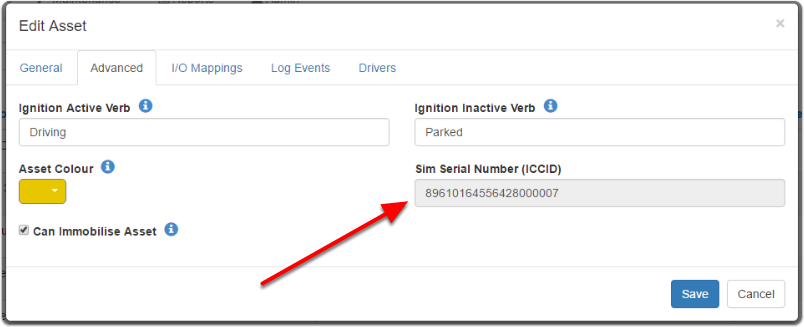
      You can find the SIM ICCID on the 'Advanced' tab of the Asset edit menu. Assets >> Manage Asset >> Edit Asset
      Asset List Report

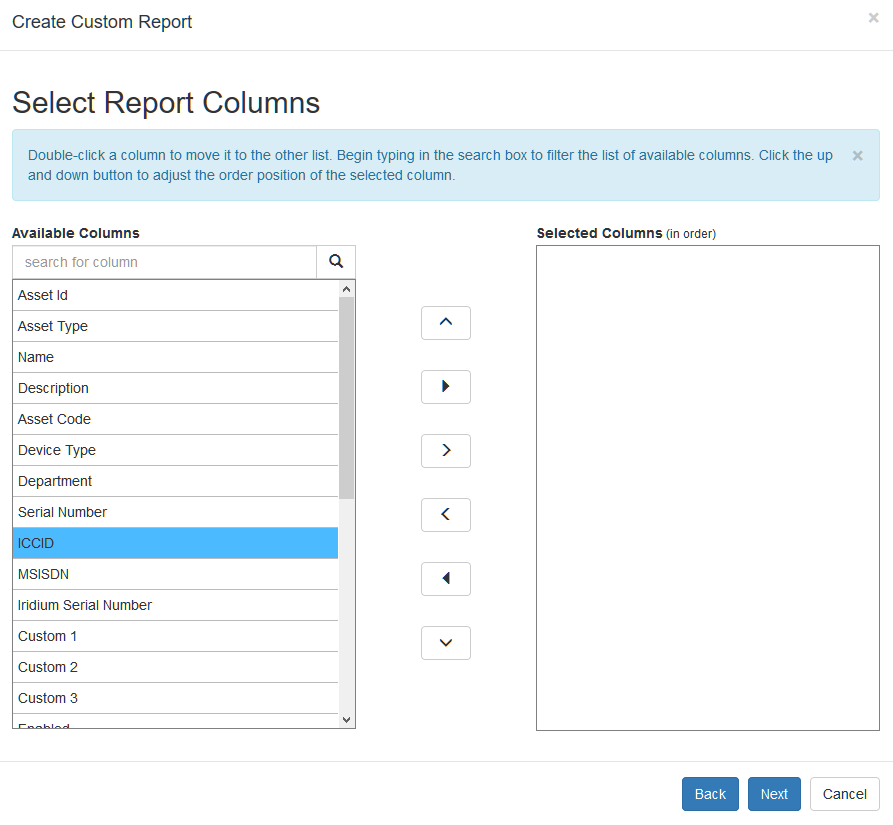
      The ICCIDs are also a part of the Asset List report in reports > Fleet Reports > Asset List

      To make the ICCID appear on the report, you'll need to customise the columns under 'Advanced Options' and selecting the ICCID in the column view. While the MSISDN appears in the columns, it does not come out into the report yet.

      sim numbers sim cards

      Was this article helpful?

      Yes
      No
      Give feedback about this article

      Related Articles

      • A Guide to SIM Cards, ICCIDs and Reports
      • SIM Providers: LTE-M/Nb-IoT + Roaming, and Setup

      Subscribe to Partner News

      Subscribe to our mailing list to receive Digital Matter news, product and tehnical updates, and more.

      Subscribe

      Copyright © Digital Matter . All Rights Reserved.

      Privacy Contact Support

      Knowledge Base Software powered by Helpjuice

      DM Logo
      Expand