Dingtek Cement Drum Sensor

Written by Matthew Clark-Massera
Updated at February 1st, 2023
Table of Contents
The G120 (firmware 2.9 and above) supports the use of the Dingtek DZ300 cement drum sensor. The sensor measures the RPM and direction of barrel rotation. When connected to a G120 via the RS232 port - the RPM is reported to the server in Analogue 11, with positive or negative values to indicate direction.
Wiring
The sensor must be powered, and also connected to the RS232 port on the G120. Check the Dingtek Manual for full instructions. The correct wiring diagram is 7.3 as per the Dingtek Instructions.
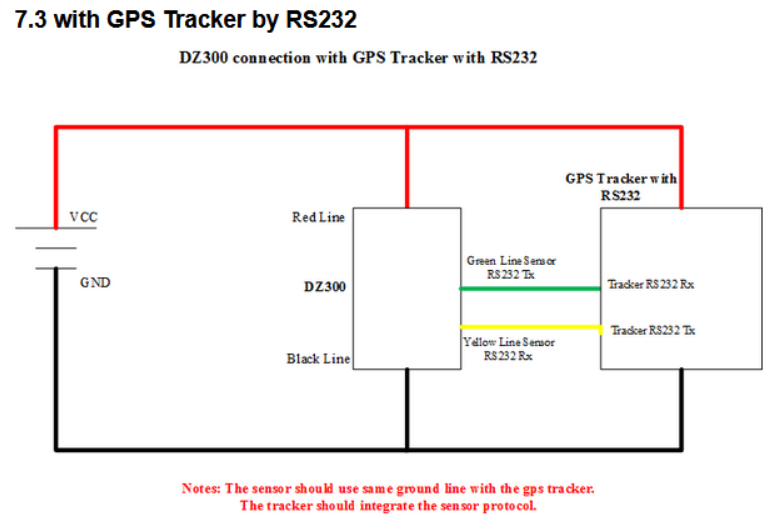
Source: Dingtek (http://www.dingtek.com/product/140-en.html)
This is:
- Sensor Red Wire -> Power supply (10-32V DC)
- Sensor Black Wire -> Ground (any black wire on the G120)
- Sensor Yellow Wire (RS232 RX) -> G120 Black/White, Pin 22 (RS232 TX)
- Sensor Green Wire (RS232 TX) -> G120 Violet, Pin 21 (RS232 RX)
- The G120 must be powered and wired to ignition etc as usual.
Additionally, the sensor must be installed in a fixed location, and a magnet attached to the barrel - this is how the RPM is measured. Consult the Dingtek instructions for guidance.
Parameter Setup
Add RS232 function tab, and set the function to DZ300 Drum Sensor (default is Iridium)

Operation
Once set up as described, while in trip only, the G120 will constantly listen for the output of the sensor, and write the value to Analogue 11 as each record is received. The sensor sends values about once per second (1Hz).
New logs are not generated for these reads, but as the G120 generates other logs (i.e. the in trip 60 sec logs) - this value will be passed up to the server.
Rotation Direction
The sensor is marked with a sticker indicating A --> B. So when the magnet passes in this direction, it is travelling in the A->B direction. The G120 considers this positive RPM - and B->A the negative rotation direction.
So a reading of 100 in analogue 11 indicates 100 RPM in the A->B direction, -50 is 50 RPM in the B->A direction.
Averaging
The Dingtek Sensor applies some averaging to the RPM value. This seems to be around 4 minutes. So if you rapidly increase the RPM for a short time (i.e. while testing), it might not be noticable in the uploads to the server.
