Contact Us

    If you still have questions or prefer to get help directly from an agent, please submit a request.
    We’ll get back to you as soon as possible.

    Please fill out the contact form below and we will reply as soon as possible.

    • Digital Matter Site
    • Contact Us

    SensorNode LoRaWAN® - Wiring up a DM Temperature sensor

    Written by Matthew Clark-Massera

    Updated at January 27th, 2023

      Contact Us

      If you still have questions or prefer to get help directly from an agent, please submit a request.
      We’ll get back to you as soon as possible.

      Contact Support
      • Home
      • Devices
      • SensorData and SensorNode LoRaWAN®

      DM produces I2C temperature probes. These can be connected to the SensorNode to read temperature at regular intervals.
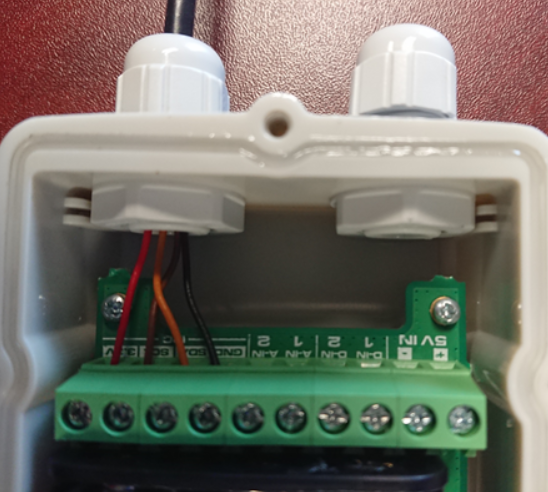
      DM temperature probes use the following wiring colours:

      • Red = Positive - connect to 3.3V
      • Brown = Clock - connect to SCL
      • Orange = Data - connect to SDA
      • Black = Ground - connect to GND

      New DM Temp Sensor:

      In 2018 we introduced a new temperature sensor that allows you to set the address to Address 1 or Address 2:

      • Address 1 (DM Temp Sensor 1): Green - connect to ground
      • Address 2 (DM Temp Sensor 2): Green - connect to 3.3V
      • The rest of the wiring stays the same

      Was this article helpful?

      Yes
      No
      Give feedback about this article

      Related Articles

      • Connecting the SensorNode to the Config App
      • SensorNode: Wiring up a DM Temp/RH sensor
      • SensorNode Configuration App

      Subscribe to Partner News

      Subscribe to our mailing list to receive Digital Matter news, product and tehnical updates, and more.

      Subscribe

      Copyright © Digital Matter . All Rights Reserved.

      Privacy Contact Support

      Knowledge Base Software powered by Helpjuice

      DM Logo
      Expand