Contact Us

    If you still have questions or prefer to get help directly from an agent, please submit a request.
    We’ll get back to you as soon as possible.

    Please fill out the contact form below and we will reply as soon as possible.

    • Digital Matter Site
    • Contact Us

    Sending Sigfox and LoRaWAN® Downlinks

    Written by Matthew Clark-Massera

    Updated at January 27th, 2023

      Contact Us

      If you still have questions or prefer to get help directly from an agent, please submit a request.
      We’ll get back to you as soon as possible.

      Contact Support
      • Home
      • Devices
      • LoRaWAN® - General

      To configure LoRaWAN and Sigfox devices over the air, a configuration messages can be sent to the devices by sending a downlink request to them in Telematics Guru. 

      Below are the simple steps to send a downlink message to LoRaWAN and Sigfox devices. 

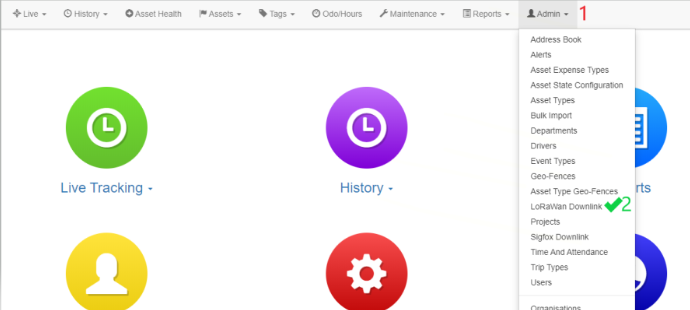
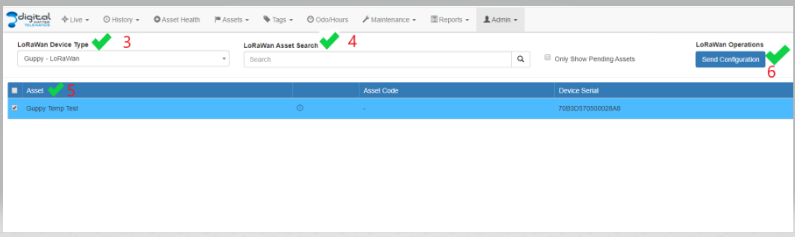
      Sending LoRaWAN Downlink in Telematics Guru. 

      1. Log into your Organization on TG
      2. Admin -> LoRaWAN downlink

      1. Choose LoRaWAN Device Type
      2. Select the Device and Click on Send Configuration
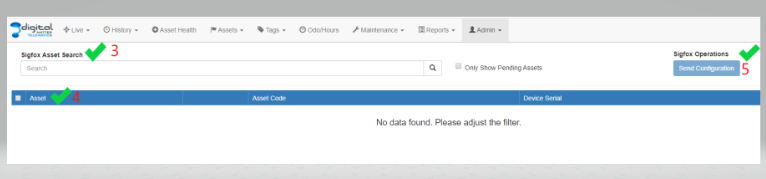
      Sending Sigfox Downlink in Telematics Guru. 

      1. Log into your Organization on TG
      2. Admin -> Sigfox downlink

      1. Search for your Sigfox Device/Asset
      2. Select the Device and Click on Send Configuration
      Considering the Sigfox/LoRaWAN data plan. 

      *When sending downlink messages, it is important to Consider your existing Sigfox/LoRaWAN data plan, as this may have an impact due to duty cycle limitations on the number of downlinks you can send.

      Sigfox generally allows a maximum of 4 downlink messages per day. While LoRaWAN is not really limited, it has a downlink rate of up to 10 messages per day for each node connected to the network. The rate is therefore dependent on the efficiency of the payload and how many devices are connected to each node.

      lorawan downlink sigfox downlink

      Was this article helpful?

      Yes
      No
      Give feedback about this article

      Related Articles

      • LoRaWAN® Overview
      • SensorData/SensorNode Overview of Operation
      • Digital Matter LoRaWAN® stack join schedule
      • IoT Devices - Schedules

      Subscribe to Partner News

      Subscribe to our mailing list to receive Digital Matter news, product and tehnical updates, and more.

      Subscribe

      Copyright © Digital Matter . All Rights Reserved.

      Privacy Contact Support

      Knowledge Base Software powered by Helpjuice

      DM Logo
      Expand