Checklists - QR Code Generation and Scanning

Written by Matthew Clark-Massera
Updated at June 29th, 2023
Table of Contents
Checklists can be configured such that an asset and/or project selection is required.

i.e. - We have completed a Vehicle Prestart on Truck ABC 123, for a specific project.
Telematics Guru can generate data to create QR Codes for a checklist. The QR code can be attached to an asset, and then if a user scans this QR code from within the TG app, the asset and project information can be pre-filled for them - to simplify the process for vehicle operators and ensure all data is captured correctly. Additionally, this will take the user to the right checklist and linked documents.
Generating QR Codes

- Go to the "Generate QR Code" tab on a checklist
- Select the chosen asset type and click Generate
- A CSV will be downloaded, the example output below
| #Checklist: Maintenance Checklist | |
| #Organisation: Digital Matter - Australia | |
| Asset Name | QR Code Data |
| General for Maintenance Checklist | eyJjSWQiOj*************************** |
| 269471 | eyJhSWQiOj************************************ |
| 643223 | eyJhSWQiOjU************************************ |
| Battery Test | eyJhSWQiOjQ************************************ |
| G120 Temp Monitor | eyJhSWQiOjQ************************************ |
| James' Dev Bolt | eyJhSWQiOjQ************************************ |
This generates code data per asset.
From there, the CSV can be loaded into a service such as https://www.qr-code-generator.com/ - QR codes printed, and attached to an asset.
Scanning QR Codes
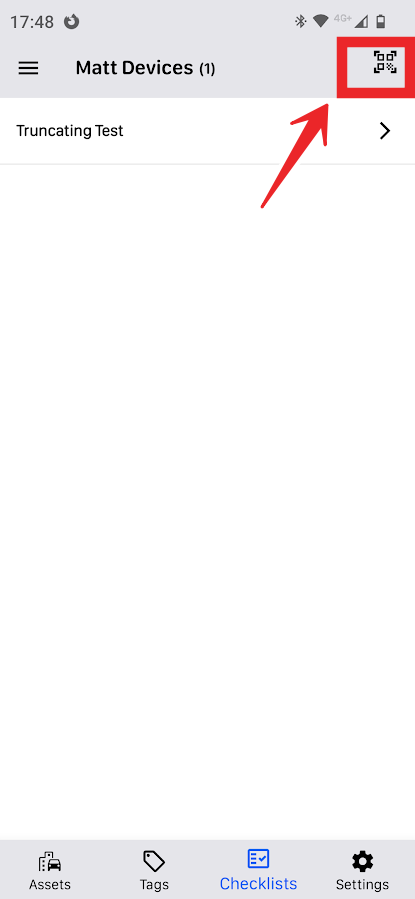
From the Checklists menu, the following icon appears,