Contact Us

    If you still have questions or prefer to get help directly from an agent, please submit a request.
    We’ll get back to you as soon as possible.

    Please fill out the contact form below and we will reply as soon as possible.

    • Digital Matter Site
    • Contact Us

    Asset Bulk Update

    Written by Matthew Clark-Massera

    Updated at November 14th, 2023

      Contact Us

      If you still have questions or prefer to get help directly from an agent, please submit a request.
      We’ll get back to you as soon as possible.

      Contact Support
      • Home
      • Telematics Guru
      • Getting Started

      There are multiple configuration options for assets. 

      Often when setting up system features, a similar configuration needs to be set for each asset, or even 1 single change may need to be made to all assets. Asset Bulk Update makes this management easily. 

      To make asset updates in bulk, go to Assets -> Manage Assets. 

      The Bulk Update button will be greyed out. At least one asset must be selected in for the button to become active. 

      Select the assets you wish to make changes to, and click the Bulk Update button, a dialogue box appears. 

      The below GIF shows the available functions and runs through some setup. 
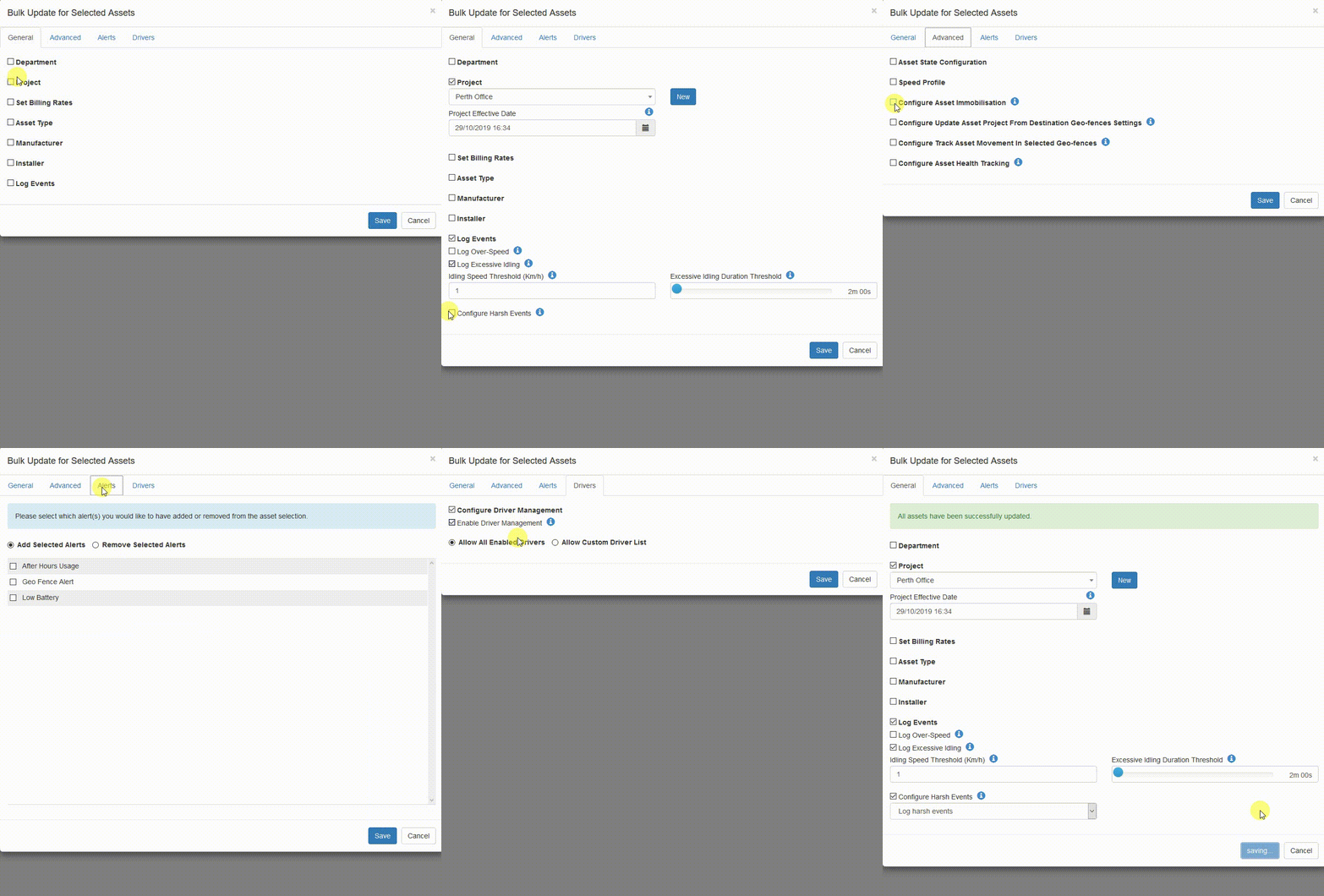
      assets bulk update tg telematics guru update

      Was this article helpful?

      Yes
      No
      Give feedback about this article

      Related Articles

      • Introducing Telematics Guru
      • TG Region Specific Details
      • Telematics Guru - Quick Start Guide
      • Create a New Organisation

      Subscribe to Partner News

      Subscribe to our mailing list to receive Digital Matter news, product and tehnical updates, and more.

      Subscribe

      Copyright © Digital Matter . All Rights Reserved.

      Privacy Contact Support

      Knowledge Base Software powered by Helpjuice

      DM Logo
      Expand