Contact Us

    If you still have questions or prefer to get help directly from an agent, please submit a request.
    We’ll get back to you as soon as possible.

    Please fill out the contact form below and we will reply as soon as possible.

    • Digital Matter Site
    • Contact Us

    Call the Current Driver from the App

    Written by Matthew Clark-Massera

    Updated at January 26th, 2023

      Contact Us

      If you still have questions or prefer to get help directly from an agent, please submit a request.
      We’ll get back to you as soon as possible.

      Contact Support
      • Home
      • Telematics Guru
      • Mobile App

      The TG app allows for the ability to call the current driver of an asset direct from the app.

      Against any asset, we can see the current driver. So if there is a problem related to this asset, it's convenient to be able to click the 3 dots and ring the driver. 
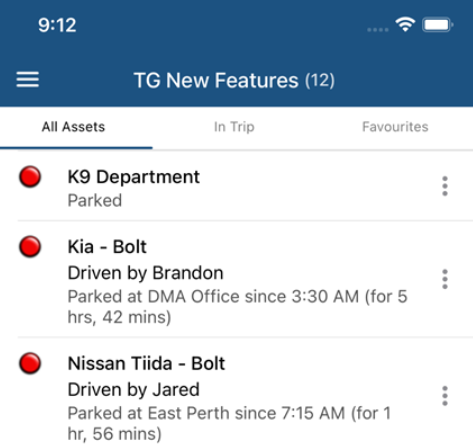
      To configure, we need to have the Driver's phone number entered in the system. So to set up:

      1. Create an Address Book Entry, and add the Driver's Number

      - Admin -> Address Book 


      2. Link the Driver to the Address Book entry

      User accounts, drivers, and address book entry are all separate entities/concepts that serve different purposes. But we can easily link them together. 
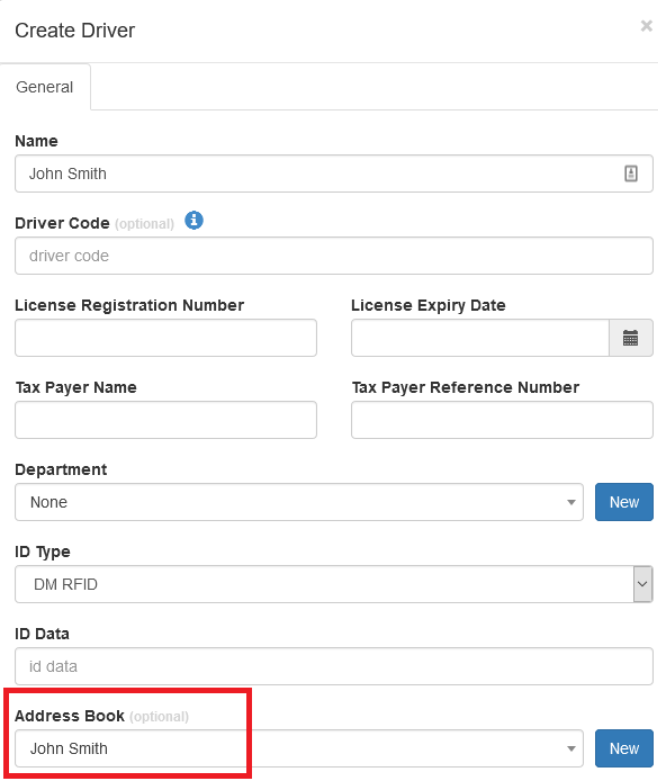
      3. We can now call the driver from the app

      Was this article helpful?

      Yes
      No
      Give feedback about this article

      Related Articles

      • Push Notifications in the TG App
      • Telematics Guru Mobile Release Notes

      Subscribe to Partner News

      Subscribe to our mailing list to receive Digital Matter news, product and tehnical updates, and more.

      Subscribe

      Copyright © Digital Matter . All Rights Reserved.

      Privacy Contact Support

      Knowledge Base Software powered by Helpjuice

      DM Logo
      Expand